Are you ready to upgrade your TV sound without buying a new soundbar? Connecting your TV to bookshelf speakers can bring richer, clearer audio right into your living room.
But how do you make sure everything works perfectly together? This guide will walk you through simple steps to connect your TV to bookshelf speakers, even if you’re not tech-savvy. By the end, you’ll enjoy a powerful sound experience that makes every movie, show, or game feel more immersive.
Keep reading—you’re just moments away from transforming your TV sound!
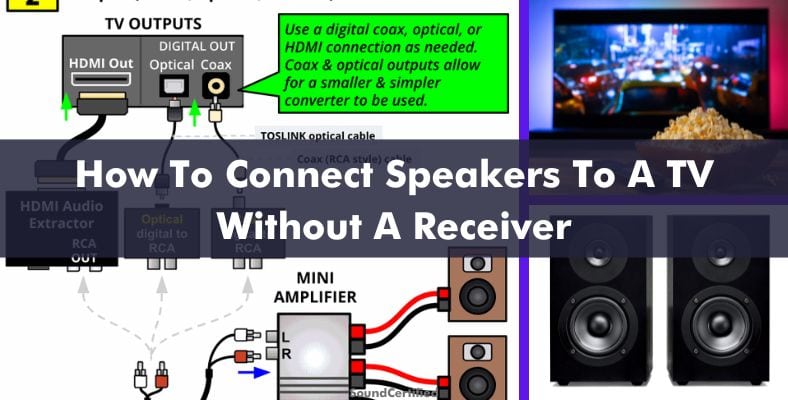
Credit: soundcertified.com
Choosing The Right Bookshelf Speakers
Choosing the right bookshelf speakers is key to good sound from your TV. The right speakers deliver clear audio and fit your room well. They must work well with your TV and give enough power for loud, clear sound.
Understanding speaker features helps you pick the best match. Focus on compatibility, power, and sound quality. These factors affect how well your speakers perform with your TV.
Speaker Compatibility With Tv
Check if your TV supports external speakers. Many TVs have audio outputs like optical, RCA, or HDMI ARC. Match these with speaker inputs or an amplifier. Some bookshelf speakers need an amplifier or receiver to connect to your TV. Confirm your TV and speaker connection types before buying.
Wattage And Power Handling
Wattage shows how much power a speaker can handle. Choose speakers with wattage close to your amplifier’s output. Too low wattage can cause distortion or damage. Too high wattage is usually safe but may waste energy. Aim for balanced power to avoid poor sound or speaker damage.
Speaker Impedance And Sensitivity
Speaker impedance affects how much load the speaker puts on the amplifier. Most bookshelf speakers have 4 to 8 ohms impedance. Match this with your TV or amplifier’s recommended range. Sensitivity shows how loud the speaker gets from a small power input. Higher sensitivity means louder sound with less power. Pick speakers with good sensitivity for clear, strong audio.
Required Equipment And Accessories
Connecting your TV to bookshelf speakers needs specific equipment. Each part plays a key role in sound quality and ease of setup. Knowing what to get helps you build a strong audio system. Below are the main accessories and tools needed for this connection.
Speaker Wire And Connectors
Speaker wire carries sound signals from the TV or amplifier to the speakers. Choose wire with enough length to reach your speakers without tight bends. Thicker wire means better sound, especially for longer runs. Connectors like banana plugs or spade connectors make attaching wires easier and more secure. They help prevent loose connections and signal loss.
Amplifier Or Receiver Options
Bookshelf speakers usually need an amplifier or receiver to work with a TV. These devices boost the sound signal to drive the speakers properly. Some TVs have built-in amplifiers, but many require an external one. Look for amplifiers or receivers with HDMI or optical inputs for better TV compatibility. They also offer volume control and sound tuning features.
Additional Audio Cables
Audio cables link your TV to the amplifier or receiver. Common types include HDMI, optical (TOSLINK), and RCA cables. HDMI cables carry both video and audio, simplifying connections. Optical cables transfer digital audio with little interference. RCA cables handle analog audio but may need adapters depending on your TV’s outputs. Choose the right cable based on your TV and amplifier inputs.
Connecting Directly To The Tv
Connecting bookshelf speakers directly to your TV is a simple way to improve sound quality. Most modern TVs have built-in audio outputs that let you link external speakers easily. This method avoids extra devices and wires, keeping your setup clean and straightforward.
Below are common ways to connect your speakers straight to the TV. Each option depends on the ports your TV and speakers have.
Using Headphone Or Audio Out Jack
Many TVs have a headphone jack or a 3.5mm audio out port. Use a 3.5mm to RCA cable or a 3.5mm to 3.5mm cable to connect this port to your bookshelf speakers. This is the easiest method if your speakers accept these inputs.
Plug the cable into the TV’s headphone jack and the other end into your speakers. Turn on the TV and speakers, then adjust the volume. This connection sends stereo sound directly to your speakers.
Connecting With Rca Outputs
Some TVs feature red and white RCA audio output ports. These are common on older models and many bookshelf speakers use RCA inputs. Use an RCA cable to connect the TV’s audio out ports to your speakers.
Match the red and white plugs to the same colors on both devices. This connection delivers clear stereo sound. It’s a reliable option for TVs without a headphone jack.
Limitations Of Direct Connection
Direct connections often provide basic sound quality without extra effects. TVs may limit volume control when using headphone or RCA outputs. Some bookshelf speakers need power or an amplifier to work properly.
Also, some newer TVs lack analog audio outputs, making direct connections impossible. In such cases, alternative methods like using an amplifier or Bluetooth may be necessary.

Credit: soundcertified.com
Using An Amplifier Or Receiver
Using an amplifier or receiver is a common way to connect your TV to bookshelf speakers. It helps improve sound quality and gives you better control over volume and settings. The amplifier boosts the audio signal so the speakers can deliver clear and loud sound. A receiver can also switch between different devices connected to your TV setup.
Connecting Tv To Amplifier
First, find the audio output ports on your TV. These might be optical, RCA, or headphone jacks. Use the correct cable to connect the TV output to the amplifier’s input. Make sure the cable is fully plugged in on both ends. Switch your TV audio settings to output sound through the connected port.
Connecting Amplifier To Speakers
Next, connect the amplifier to your bookshelf speakers. Use speaker wires that match the amplifier’s terminals. Attach the positive and negative wires to the correct terminals on both the amplifier and speakers. Tighten the connections to avoid loose contacts. Place the speakers where you want clear sound in the room.
Adjusting Volume And Sound Settings
Turn on the amplifier and your TV. Start with the volume low to protect your ears and speakers. Increase volume gradually to a comfortable level. Use the amplifier’s tone controls to adjust bass and treble. Test different settings to find the best sound for your room. Make sure the sound is clear and balanced.
Wireless Connection Alternatives
Connecting your TV to bookshelf speakers wirelessly offers a neat, cable-free setup. This method keeps your space tidy and lets you place speakers anywhere. Several wireless options fit different needs and budgets.
Bluetooth Adapters
Bluetooth adapters are small devices that link your TV to speakers. They plug into your TV’s audio output, sending sound wirelessly. Many adapters support good sound quality and easy pairing. You just need to connect the adapter to your speakers. Bluetooth works well in small rooms with few obstacles.
Wi-fi Audio Solutions
Wi-Fi audio solutions use your home network to stream sound from TV to speakers. These systems often offer better range and sound quality than Bluetooth. Some smart speakers support Wi-Fi streaming directly. You may need a hub or app for setup and control. Wi-Fi suits larger rooms or multi-room audio setups.
Pros And Cons Of Wireless Setup
Wireless connections reduce cable clutter and offer flexible speaker placement. They allow easy connection to multiple devices. Sound quality depends on the technology and distance from the TV. Wireless signals may face interference or delays. Battery-powered speakers need charging or power supply. Choose wireless options based on your room size and sound needs.
Positioning And Placement Tips
Positioning and placement play a big role in how your bookshelf speakers sound with your TV. Proper setup lets you enjoy clear and rich audio. Small changes in speaker location can improve sound quality a lot. Follow these tips to get the best sound from your bookshelf speakers.
Optimal Speaker Placement
Place bookshelf speakers at ear level when seated. This ensures sound travels directly to you. Keep speakers about 6 to 12 inches away from walls. Avoid pushing them into corners to reduce bass distortion. Space the speakers evenly on each side of the TV. Angle them slightly toward your listening area. This creates a balanced and immersive sound field.
Reducing Sound Distortion
Avoid placing speakers on soft surfaces like sofas or carpets. These absorb sound and cause muffling. Use solid, stable stands or shelves for the best support. Keep speakers away from objects that block sound waves. Clear space around the speakers lets sound move freely. Adding foam pads under speakers can reduce vibrations and rattles.
Enhancing Audio Experience
Experiment with speaker distance from the TV and walls. Small moves can change sound clarity and bass response. Try to create a triangle between your ears and the two speakers. This setup improves stereo imaging and sound depth. Adjust speaker height and angle for the clearest dialogue and effects. Test different settings to find what sounds best in your room.
Troubleshooting Common Issues
Troubleshooting common issues helps keep your TV and bookshelf speakers working well. Small problems can stop your speakers from playing sound clearly. This section shows easy fixes for usual problems. Follow these tips to enjoy better sound from your setup.
No Sound Or Low Volume
Check if your speakers are powered on. Confirm the TV volume is not muted or very low. Make sure the cables connect firmly between the TV and speakers. Try using another audio cable to rule out a bad wire. Adjust the TV’s audio output settings to match your speaker type. Sometimes, choosing the wrong output causes no sound.
Audio Delay Problems
Audio delay makes sound come late from speakers. This can spoil watching experience. Look for a setting called “Audio Sync” or “Lip Sync” on your TV. Adjust this to reduce delay. Using wireless connections may cause lag. Using wired connections often lowers delay. Keep your devices’ software updated for best results.
Distortion And Interference
Distorted sound means unclear or crackling noise. Check if speaker wires are damaged or loose. Move speakers away from other electronics that cause interference. Avoid placing speakers near Wi-Fi routers or cordless phones. Lower the volume if distortion happens at high levels. Clean speaker cones gently to remove dust buildup.

Credit: www.reddit.com
Frequently Asked Questions
How Do I Connect A Tv To Bookshelf Speakers?
Use an amplifier or receiver between your TV and speakers. Connect the TV’s audio output to the amplifier, then connect the amplifier to the bookshelf speakers using speaker wires.
Can I Use Bluetooth To Connect Tv To Bookshelf Speakers?
Yes, if your bookshelf speakers have Bluetooth or you use a Bluetooth transmitter with your TV. This allows wireless audio streaming from TV to speakers.
Do Bookshelf Speakers Need An Amplifier With A Tv?
Yes, most bookshelf speakers are passive and require an amplifier or receiver to power them when connected to a TV.
What Cables Are Needed To Connect Tv To Bookshelf Speakers?
You typically need speaker wire and an audio cable like RCA, 3. 5mm, or optical cable depending on your TV and amplifier inputs.
Conclusion
Connecting your TV to bookshelf speakers can greatly improve sound quality. Choose the right cables and check your TV’s audio output options. Make sure speakers and TV are compatible for the best results. Keep the setup simple and test the sound after connecting.
Enjoy clearer, richer audio during your favorite shows and movies. This small change can make a big difference in your viewing experience. Take your time and follow each step carefully. Sound matters, and bookshelf speakers can deliver it well.