Using your laptop on a bunk bed can be tricky, but it doesn’t have to be uncomfortable or unsafe. If you’ve ever tried balancing your laptop while lying or sitting up there, you know how frustrating it can get.
What if you could find easy, smart ways to make your bunk bed work perfectly for your laptop use? You’ll discover simple tips and clever hacks to keep your laptop steady, protect your neck and back, and create a cozy workspace right on your bunk bed.
Keep reading, and you’ll learn how to turn your bunk bed into a comfy, productive spot in no time.
Credit: www.amazon.com
Choosing The Right Laptop Setup
Choosing the right laptop setup is important for using your laptop comfortably on a bunk bed. The right setup helps avoid neck and back pain. It also makes your work or study time more productive and enjoyable. Simple tools and the right laptop can make a big difference.
Selecting A Lightweight Laptop
A lightweight laptop is easier to carry and use on a bunk bed. It reduces strain on your arms and neck. Choose a model that is slim and not too heavy. A small screen size can also be easier to handle. Look for laptops with good battery life to avoid frequent charging.
Using A Laptop Stand Or Tray
A laptop stand or tray keeps your laptop stable and at a good height. It helps you avoid bending your neck too much. Some stands are adjustable, so you can change the angle easily. A tray with raised edges stops your laptop from slipping. It also creates space for a mouse or a notebook.
Ergonomic Accessories
Ergonomic accessories improve comfort during long use. A separate keyboard and mouse help keep your hands in a natural position. Cushions or pillows can support your back or arms. Wrist rests reduce pressure on your wrists. These small additions help prevent pain and fatigue.
Optimal Bunk Bed Arrangement
Setting up your laptop on a bunk bed needs smart planning. The right arrangement helps keep your laptop safe and your space neat. It also makes using your laptop more comfortable. Small changes can make a big difference.
Focus on stability, safety, and space. These are key to a good setup on a bunk bed.
Positioning Your Laptop For Stability
Place your laptop on a flat, firm surface. Avoid soft or uneven spots that can cause wobbling. Use a small, sturdy table or lap desk designed for beds. Keep the laptop close to your body to prevent it from slipping. Ensure good ventilation to stop overheating.
Adjusting Bed Rails And Supports
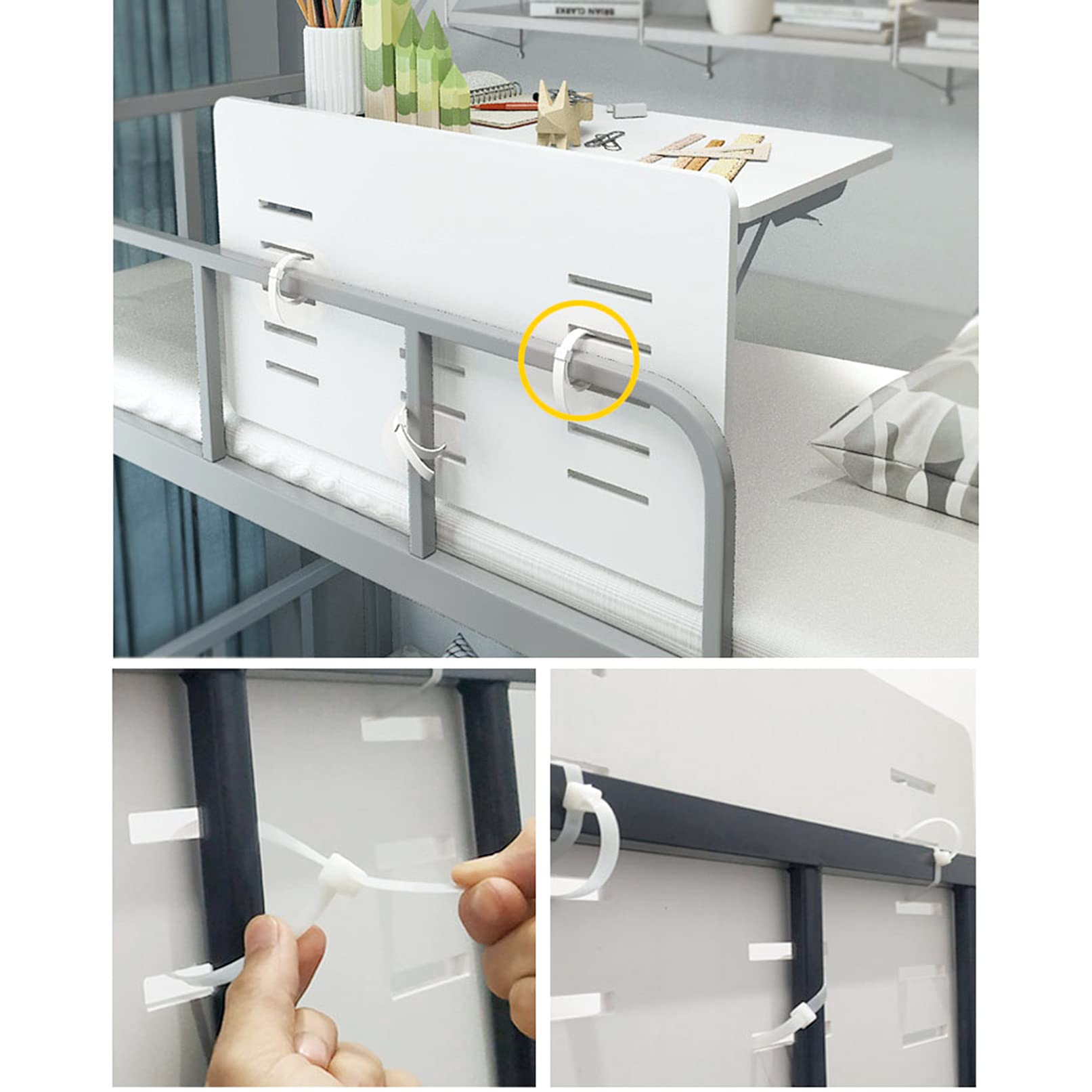
Move bed rails to create more space for your laptop. Secure rails so they do not move or fall. Use clamps or hooks to hold your laptop table in place if needed. Check that the supports can carry the laptop’s weight safely. Avoid blocking your view or access to the laptop.
Maximizing Space And Comfort
Use vertical space by attaching shelves or organizers to bed posts. Keep cables tidy with clips or ties to prevent tangling. Arrange pillows for back and arm support while using your laptop. Choose a lightweight laptop stand that is easy to move. Keep essentials like chargers and notebooks close by but out of the way.
Maintaining Comfort While Working
Working on a laptop while sitting on a bunk bed can be cozy. Comfort matters. Without it, focus and productivity drop fast. Small changes make a big difference. Focus on posture, cushions, and lighting to stay comfortable and work well.
Proper Posture Tips
Keep your back straight. Avoid slouching or leaning too far forward. Support your lower back with a small cushion. Place the laptop at eye level to reduce neck strain. Use a lap desk or a firm surface for stability. Take breaks to stretch often.
Using Cushions And Pillows
Soft cushions protect your hips and back. Place a pillow behind your lower back. Use another cushion under your knees if sitting cross-legged. Cushions help keep your body relaxed and reduce pressure points. Choose firm but comfortable pillows for best support.
Lighting Considerations
Good lighting prevents eye strain. Use a desk lamp or clip-on light near your laptop. Avoid harsh overhead lights that cause glare. Natural light works well but avoid direct sunlight on the screen. Adjust brightness and contrast on your laptop for comfort.

Credit: unsplash.com
Ensuring Safety Measures
Using a laptop on a bunk bed needs extra care. Safety is very important to avoid accidents. A few simple steps can keep you and your laptop safe. Follow these tips to make your space secure and comfortable.
Preventing Laptop Falls
Place your laptop on a flat, stable surface. Avoid edges where it can slip off. Use a non-slip mat under the laptop for extra grip. Keep the laptop away from the bed’s edge. Close the laptop when not in use to prevent accidents.
Securing Electrical Cords
Arrange cords neatly to stop tripping hazards. Use clips or ties to bundle cables together. Keep cords away from walkways and edges of the bed. Unplug the charger when not charging to reduce risk. Check cords for damage before use to avoid shocks.
Fire Safety Precautions
Do not cover the laptop’s vents; it can overheat. Avoid placing the laptop on soft surfaces like pillows. Use a laptop cooling pad to keep temperatures down. Keep flammable materials like blankets away from the laptop. Have a smoke detector nearby for added safety.
Enhancing Productivity On A Bunk Bed
Working on a laptop from a bunk bed can be tricky. The space is small, and distractions are close. But with the right habits, you can get a lot done. Focus and good planning help you stay productive. Here are ways to improve your work time on a bunk bed.
Minimizing Distractions
Keep your phone on silent or away. Noise can break your focus quickly. Use headphones to block out sounds. Make sure the bed area is tidy. Clutter can distract your mind. Set clear rules for others not to disturb you. A quiet space helps your brain work better.
Time Management Strategies
Plan your work in short sessions. Use a timer to keep track. Take small breaks to rest your eyes and hands. Avoid long, nonstop work periods. Write a simple to-do list for each session. This keeps you clear about your goals. Time limits boost your focus and stop procrastination.
Maintaining Focus And Motivation
Start with easy tasks to build momentum. Reward yourself after finishing parts of your work. Keep water nearby to stay fresh. Change your position if you feel tired. Remember why you work hard. Small wins keep your energy up. Stay positive and keep trying.
Credit: aeroclubcomo.com
Frequently Asked Questions
How To Set Up A Laptop On A Bunk Bed Safely?
Use a sturdy laptop stand or tray designed for beds. Ensure it fits securely and won’t tip over. Position the stand to avoid strain on your neck and wrists. Keep cables organized to prevent tripping or damage. Safety is key for comfortable use.
What Are The Best Laptop Accessories For Bunk Beds?
Consider a flexible laptop stand, clip-on lamp, and wireless mouse. A lap desk with cushioning adds comfort. Cable organizers keep cords tidy and safe. These accessories improve convenience and enhance your bunk bed workspace.
How To Maintain Good Posture Using A Laptop On Bunk Bed?
Sit upright with your back supported. Position the screen at eye level to reduce neck strain. Use a cushioned lap desk to keep wrists aligned. Take breaks to stretch and avoid prolonged awkward positions. Proper posture prevents discomfort.
Can I Use A Laptop On A Bunk Bed Without A Desk?
Yes, use a lap desk or portable laptop stand. These provide a stable surface and improve airflow. Avoid placing the laptop directly on bedding to prevent overheating. Portable solutions make laptop use comfortable without a traditional desk.
Conclusion
Using a laptop on a bunk bed can be safe and comfortable. Choose the right spot and keep your posture straight. Use a stable surface to avoid accidents. Keep your laptop cool by allowing good airflow. Take breaks to rest your eyes and hands.
With small changes, you can work or study well from your bunk bed. Enjoy your space without risking comfort or safety. Simple steps make a big difference every day.